Test automation is an important part of every software project. Not only does it increase the quality and reliability of applications, but it also saves developers and clients time and money. In this article we'll look at how we use test automation at Ackee, which technologies we use, what the differences between various types of tests are, and how we choose which tests to automate. We'll also show how we test our own product using the Playwright framework.
Why is test automation important?
As an agency, we very often encounter great pressure on delivery speed on projects, as well as a limited budget for the project (in other words, everyone wants the app right away and for as little as possible). This means we don't always get the opportunity to write end-to-end tests for a given project. But when we do get that opportunity, we try to automate as much as possible of the tests that ensure the application works correctly and meets the client's requirements.
Test automation brings us several benefits:
- Increases application quality
- Increases development efficiency
- Increases client satisfaction
- Increases project sustainability
Which technologies do we use for automation, and why?
At Ackee we use various testing frameworks for different types of tests and application layers. Here are examples of testing frameworks we use across teams at the company:
- Frontend – Cypress: Cypress is a framework for writing end-to-end (E2E) tests for web applications. We use it for testing the user interface (UI) and interactions with the application from the user's perspective. Cypress lets us easily write, run and debug tests in a real browser. It also offers us a range of tools for visualizing, recording and analyzing tests.
- Backend – Mocha: Mocha is a framework for writing unit and integration tests for the backend part of the application. We use it for testing logic, functions and data operations on the server. Mocha lets us write tests in JavaScript, which is the same language we use for backend development. It also lets us use various libraries for assertions, spies, stubs and mocks, which help us isolate and verify the behavior of the code.
- QA – Playwright: Playwright is a framework for writing E2E tests for web and mobile applications. We use it for testing the whole application from a quality (QA) perspective. Playwright lets us write tests in TypeScript, which is a superset of JavaScript with added static type checking. It also lets us run tests in parallel and in various browsers and devices.
What are the differences between QA E2E tests and frontend tests?
As we've already mentioned, we use two different frameworks for writing E2E tests: Cypress for the frontend and Playwright for QA. That's because these two types of tests have different goals and focus.
- Frontend tests focus on the UI, aka the user interface. They test how the application displays and reacts to user actions, such as clicks, inputs, scrolling, etc. Frontend tests help us ensure that the application is functional, good-looking and usable for the user.
- QA tests focus on the whole application. They test how the application works as a whole, how it communicates with the backend, the database, external services, etc. QA tests help us ensure that the application is reliable, secure and integrated with other systems.
Why did we switch to Playwright for QA tests?
Switching to Playwright doesn't mean, however, that all tests get rewritten – that would be a step against sustainability, and we also know that Cypress has its strengths too. We use both frameworks depending on the needs and context of the project. Nevertheless, we decided to use Playwright for QA tests for several reasons:
- Really simple and fast setup. Playwright walks us through the setup in a few steps and it's done. We don't have to worry about installing browsers, drivers, dependencies, etc. Everything is ready and works out of the box.
- TypeScript native. Playwright is written in TypeScript and supports it natively. This means we can write tests in TypeScript without having to configure transpilers, linters, formatters, etc.
- Faster test runs. Playwright lets us run tests in parallel and use multiple workers. This means we can test more scenarios and browsers at once, which saves us time and increases test coverage.
- Support for multiple browsers and devices. Playwright lets us test the application in various browsers, such as Chrome, Firefox, Safari and Edge. This helps us ensure that the application works correctly and consistently across different platforms and environments.
- A rich set of features and options. Playwright offers us many features and options that make writing and running tests easier.
How do we choose which tests to automate?
For automation we choose the parts of the application that change the least but are used the most often (login, homepage, etc.). In other words, tests working with the most important functions. This helps us ensure that automated tests are stable, sustainable and efficient. When choosing tests to automate, we also take the following criteria into account:
- Risk: We choose tests that cover the parts of the application with the highest risk of failure or of causing damage. For example, tests that verify security, data protection, payment processes, etc.
- Frequency: We choose tests that cover the parts of the application that are used most often or are most affected by changes in the code. For example, tests that verify basic functions, navigation, compatibility, etc.
- Complexity: We choose tests that cover the parts of the application that are the most complex or the hardest to test manually. For example, tests that verify logic, algorithms, calculations, etc.
How do we test our product using Playwright?
Now that we've explained why and how we use test automation, let's look at how we test our own product using Playwright. Our product is a web application that lets users create, manage and share their personal and professional projects. The application is built on React and Firebase and uses Google OAuth for user authentication.
To test our product we use Playwright for writing and running E2E tests that verify the functionality and integration of the whole application. Our tests are divided into different files according to the functionalities they test, such as login, homepage, dashboard, project, task, comment, etc. Each file contains several tests that cover different scenarios and use cases.
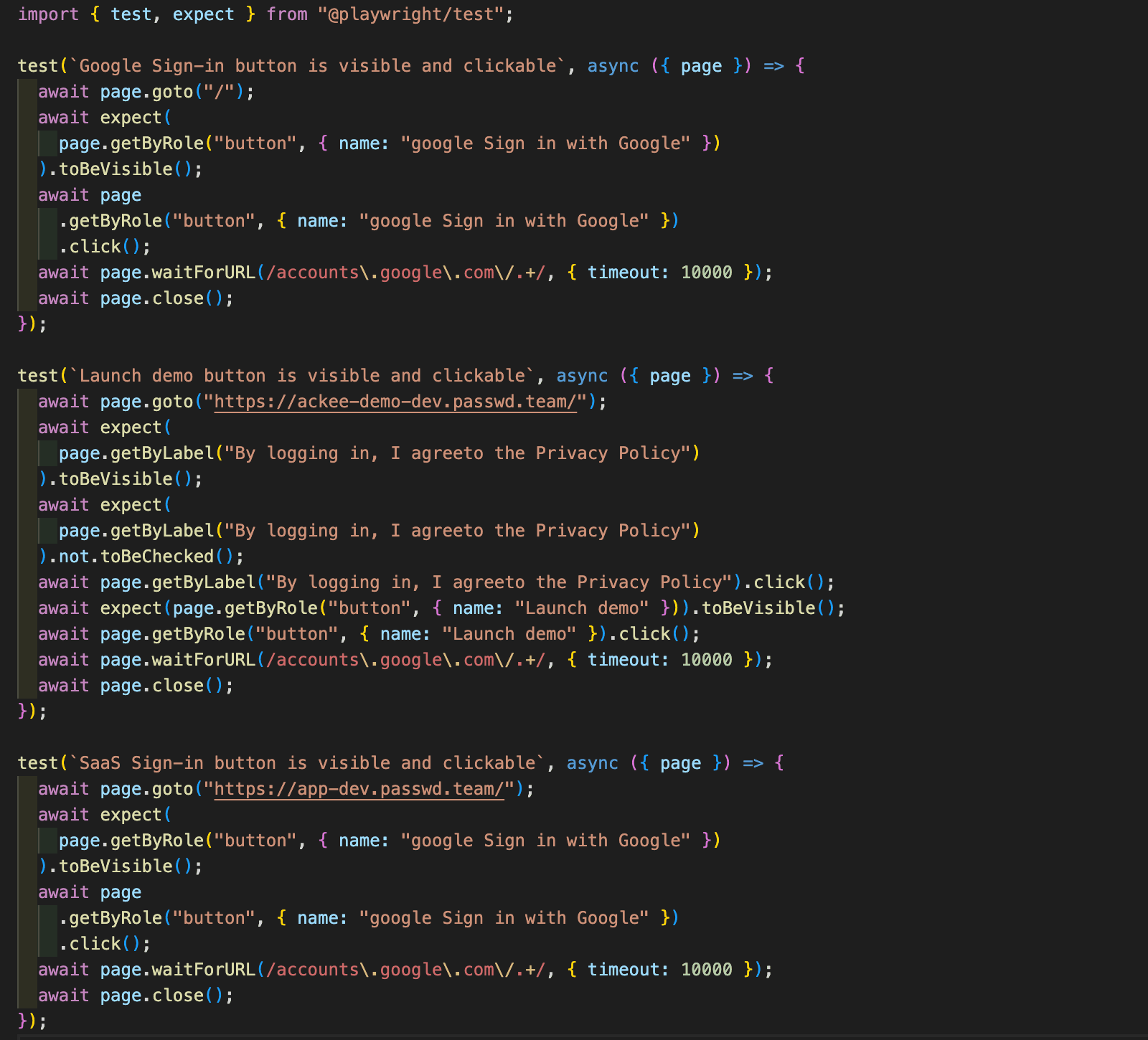
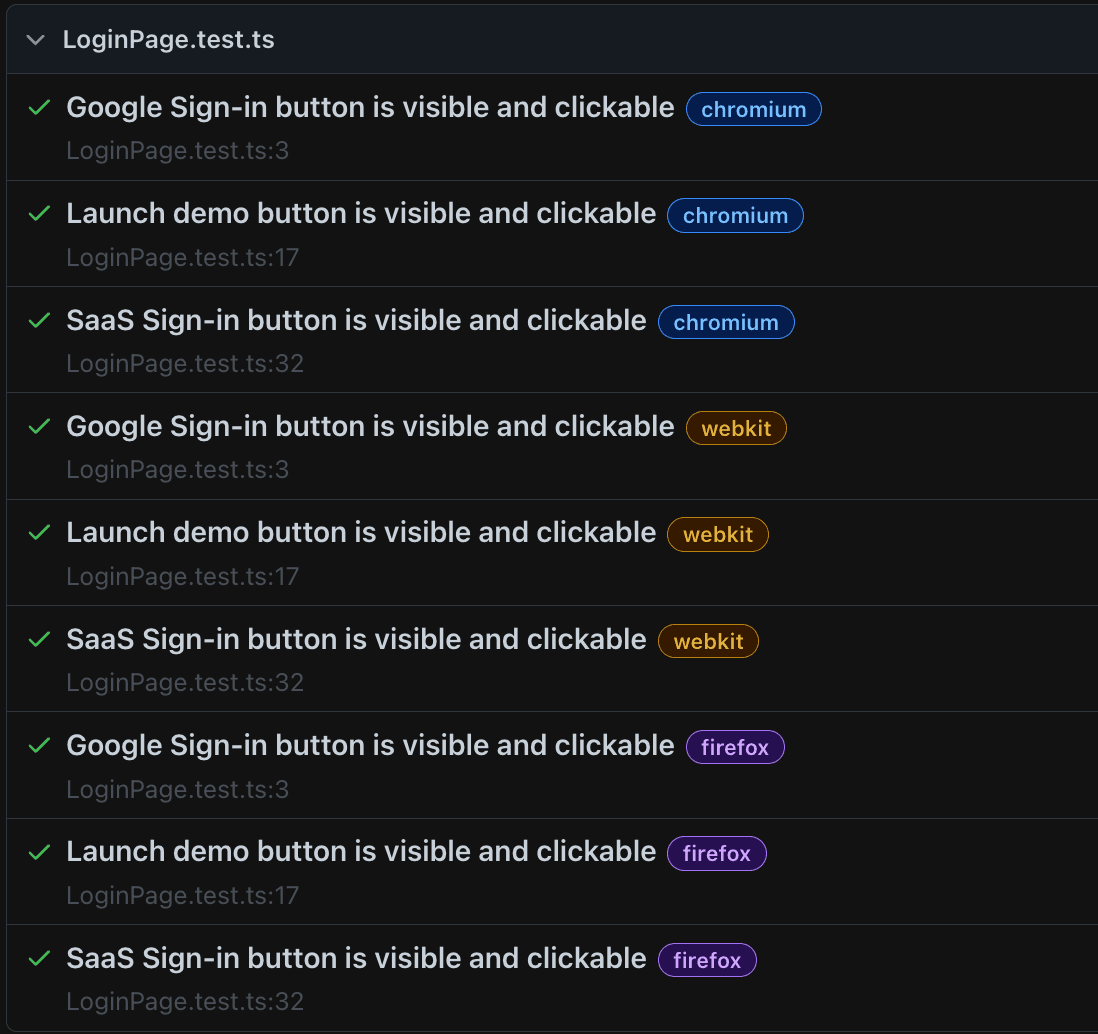
Here's an example of simple tests checking whether the user gets from the landing page of all three environments to the Google login via the Google button. As you can see on the right, the tests run in 3 browsers: Chrome, Firefox and Safari.
Test automation: how will we continue?
- We want our tests to be as efficient and sustainable as possible, which is working out thanks in no small part to the great support from our developers, and we want to keep moving forward.
- We haven't been working with Playwright for long, so one of the next priorities is to create a pipeline in which the tests will run on release. Currently we run tests only locally, which of course isn't ideal. Our goal is to change this so that everything about the tests is available to the whole team working on the project.
- For visual testing, Playwright does have its own features, but they can't be used well when running tests in a pipeline, so we'll do research on a tool that will help us with that.
Conclusion
Automation is a key tool for ensuring quality and sustainability in application development. Thanks to the effective use of frameworks like Cypress and Playwright, we're able not only to improve the reliability and functionality of our products, but also to optimize the time and resources of the development team. With the switch to Playwright, we've identified further opportunities for improvement, including implementing automated tests into the release process, and we continually strive to make our tests as efficient and sustainable as possible for the whole team.